[quote quote=4460]Because I also host a server, I use 1.6.9.2 [/quote]
Ok I see. If you host with 1.7.1.9, does it make any difference to the buildings and resolution?


[quote quote=4460]Because I also host a server, I use 1.6.9.2 [/quote]
Ok I see. If you host with 1.7.1.9, does it make any difference to the buildings and resolution?
[quote quote=4417]Hi, Im just trying to get AW2 running on a new Windows 11 Laptop. I tested it out with my desktop which has a separate install. I have 5 Joint OPs discs and I may have come unstuck by downloading the same version on my new Laptop that is on my Desktop. Anyway, I hosted on the laptop, joined on the desktop, started moving, and suddenly the desktop stopped with the message: The server has punted you. Please don’t run any trainers, hacks, or other things that can destabilise your game play experience. Make sure your version is up to date (GDCO46). I would appreciate any help or advice, Thank you [/quote]
Hi IndioBlack,
Try to host on your laptop with the exe version 1.6.9.2.
In your laptop, you can easily switch to that version when you start AW2 and the window “AW2 Launcher” opens.
Go to the tab “Game Settings” and tick off “1.6.9.2”. Click “Save settings”.
Now start AW2 and host the same map.
Players who are joining your server can still use 1.7.1.9 exe version, that has the benefit of widescreen support.
Let me know if it helps.
Ok thats interesting.
Which exe version are you using – 1.7.1.9 or 1.6.9.2?
[quote quote=4407]Ok, 1 thing I see in your .cfg is //// GENERAL version = 29 mine is 26. could this a problem and how can I solve this? [/quote]
Hi Sleepless,
The version number shouldn’t be a problem. It’s normally autogenerated.
Maybe it’s a graphics driver issue. You can try to uninstall your current gfx driver version and download an older version just to test out if it helps on the problem.
Hi Sleepless,
I found one thing in your video settings (game.cfg) that might be the reason. You have set the texture compression to maximum instead of minimum.
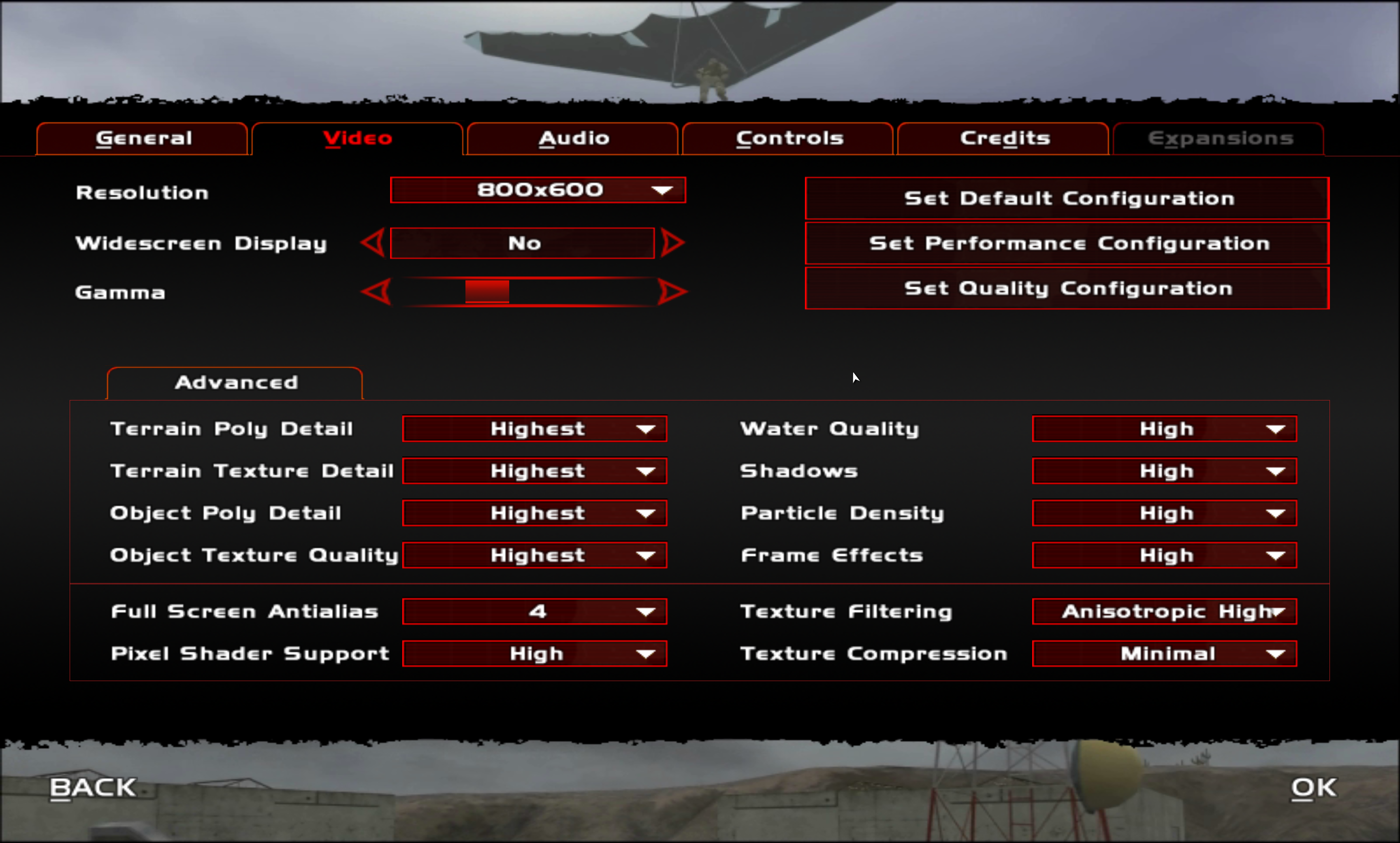
Here is how your settings should look like to the best graphics and minimum compression. Basically you don’t want any compression of textures so it needs to be set to “minimal” for the best result.
In the old days 2003, when the graphics cards could not handle it, that setting was relevant but now it is not. So we want the engine to always render everything uncompressed.
So here is a screenshot of my video settings, see attached file.
Ignore the resolution of “800 x 600” that you can see on the screenshot. It’s cause I have set it to 2560 x 1440 manually in the game.cfg to support my screen and the in-game dropdownlist does not have that as an option, so therefore it defaults back to 800×600. It does not mean anything as long as you don’t touch it. The game will still run as 2560 x 1440.
Lastly, please check out this video that I made: How to play 4K and maximum gfx in AW2
You may find the answer in there too.
Hi Sleepless,
Thanks for the attachment.
I opened it, but there is a lot of stuff missing in your game.cfg
It only contains this:
Whereas mine is this:
// game.cfg
//// GENERAL
version = 29// DISPLAY
windowed = 0
hw3d_deviceno = 0
hw3d_name = “Parallels Display Adapter (WDDM”
hw3d_guid = “D2F742A2-4340-11CF-79B67627BDC2D935”
video_res = 2560×1440
gamma = 1.0
terrain_polydetail = 3
terrain_texdetail = 3
object_polydetail = 3
object_texdetail = 3
display_16x9 = 0
water_quality = 3
shadow_quality = 3
particle_density = 2
antialias_mode = 2
texfilter_level = 3
fbeffects_level = 3
shader_usage_level = 2
texcompression_level = 2
lock_framerate = 0
force_vsync = 0
reduce_mouselag = 1
enable_keyboardtips = 0
enable_gameplaytips = 0// AUDIO
windows_volume = 255
music_volume = 192
SFXLevel = 192
DialogueLevel = 192
rotor_volume = 192
audio_channels = 2
audio_rate = 44100
NoBlood = 0
NoCasings = 0
NoSmoke = 0// CONTROLS
crosshairs = 1
crosshairs_color = 2
hitfeedback = 1
showgun = 3
hud_color_index = 2
hud_detail = 0// MULTIPLAYER
mpipaddressstring = “0.0.0.0”
mpgateserverlocalportmin = “49152”
mpgateserverlocalportmax = “65536”
mpgateserverlocalportdelta = “1”
mpgateserverlocalportrandom = “0”
mpnovaworldportmin = “32768”
mpnovaworldportmax = “65535”
mpnovaworldportdelta = “1”
mpnovaworldportrandom = “0”
mpnovaworldlanenumsessionportmin = “32768”
mpnovaworldlanenumsessionportmax = “65535”
mpnovaworldlanenumsessionportdelta = “1”
mplanserverportmin = “32768”
mplanserverportmax = “32787”
mplanserverportdelta = “1”
mplanclientportmin = “32768”
mplanclientportmax = “65535”
mplanclientportdelta = “1”
mplanclientportrandom = “0”
mplanservertojoinportmin = “32768”
mplanservertojoinportmax = “32787”
mplanservertojoinportdelta = “1”
mpmaxplayers = “64”
mpuselineupqueue = “1”
mplineupqueuesize = “100”
mphostgamepassword = “”
mphostsidepassworda = “”
mphostsidepasswordb = “”
mpnumspectatorsmax = “-1”
mphostspectatorpassword = “”
mpaccesscodelist = “”
mphostpuntplayerswithsamepcids = “1”
mptodcontinuity = “0”
mpmaxpacketsize = “1300”
mpextractextendedmetricinformation = “1”
mpnovaworldhostlanonly = “0”
mpreset = “0”
mp_eula_accepted = -1
mpattrib = 14850
join_password = “”
side_password = “”
game_name = “My awesome game name”
internet_address = “0.0.0.0”
networkconnecttype = 2
mp_difficulty = 0
mp_gametype = 0
dedicated = 0
max_team_lives = 100
max_kills = 50
max_score = 5
side_req = -1
startdelay = 0
destroybuild = 0
autobalanceonmissionrecycleenabled = 0
autobalanceonmissionrecyclenumplayerdiffmin = 1
autobalanceonmissionrecyclenumplayerdiffmax = 1
oneshotonekill = 0
fatbullets = 0
nwisptype = 5
lanmode = 1
allowcustomskins = 0
servermsg = “Have fun”
minping = 0
dominpingcheck = 0
maxping = 1500
domaxpingcheck = 0
dirtyupstream = 1
dirtyupstreampost = 1
deathmes = 1
numallowablefriendlykills = 3
replay = 1
time_limit = 30
koth_limit = 10
koth_delta = 5
timeout = 5
mp_numteams = 2
contest = 0
flagreturntime = 210
ping = 1
sendplayerlist = 1
rememberlogin = 1
teamchange_time = 15
mp_lfp_takeoverspeed = 1
spawnregulator_psp = 0
spawnregulator_lfp = 10
unlimited_vehicles = 1
choosespawnonbegin = 0
nodefaultspawnpoints = 0
mp_allowsniperscopezoom = 0
mp_permanent_death = 0
mp_3rdperson_driver = 1
mpvoting = 0
mpvoting_min_players = 6
mpvoting_percent = 0.660000
mpvoting_period = 180
mpchangeteam = 0
mpchangeteam_interval = 300
mpchangeteam_penalty = 60
mp_verbose = 1
mp_NoCharAbilities = 0
mp_NoCrossHairSpread = 0
mp_NoScopeDrift = 0
mp_NoWeaponRecoil = 0
mp_gpsicons = 0
mp_wind = 0
mp_DroppedWeaponDisappear = 0
mp_NoDropWeapons = 0
mp_NoRespawnWithPrimary = 0
enable_ai = 1
remote_admin_port = 0
cl_punkbuster = 0
sv_punkbuster = 0
xhair_appearance = 0
xhair_color = 16777215
xhair_spread = 1
balance_join = 1
balance_join_percent = 0.500000
armory_reuse_time = 30
farp_reuse_time = 90// MULTIPLAYER CLASS AVAILABILITY (0=NEVER, 1=ALWAYS, 2=MISSION DEFAULT)
avail_class_rifleman = 1
avail_class_sniper = 1
avail_class_medic = 1
avail_class_gunner = 1
avail_class_engineer = 1// MULTIPLAYER WEAPON AVAILABILITY (0=NEVER, 1=ALWAYS, 2=ARMORY ONLY, 3=MISSION DEFAULT)
avail_wpn_colt45 = 3
avail_wpn_M9Beretta = 3
avail_wpn_RemmingtonSG = 3
avail_wpn_MK23 = 3
avail_wpn_GLOCK17 = 3
avail_wpn_M4AUTO = 3
avail_wpn_M4M203AUTO = 3
avail_wpn_M16BURST = 3
avail_wpn_M16M203BURST = 3
avail_wpn_G3AUTO = 3
avail_wpn_G36AUTO = 3
avail_wpn_RPK = 3
avail_wpn_M249SAW = 3
avail_wpn_M60 = 3
avail_wpn_MAG58 = 3
avail_wpn_MP5 = 3
avail_wpn_MP5SD = 3
avail_wpn_P90AUTO = 3
avail_wpn_DRAGUNOV = 3
avail_wpn_L115A = 3
avail_wpn_SR25 = 3
avail_wpn_M21 = 3
avail_wpn_M24 = 3
avail_wpn_Barret = 3
avail_wpn_GRENADEFB = 3
avail_wpn_GRENADEHE = 3
avail_wpn_GRENADESM = 3
avail_wpn_SATCHEL_CHARGE = 3
avail_wpn_AT4 = 3
avail_wpn_MORTAR = 3
avail_wpn_STINGER = 3
avail_wpn_CLAYMORE = 3
avail_wpn_DESIGNATOR = 3
avail_wpn_RPG = 3
avail_wpn_JAVELIN = 3
avail_wpn_BODYARMOR = 3
avail_wpn_PARACHUTE = 3
avail_wpn_L1A1AUTO = 3
avail_wpn_WA2000 = 3
avail_wpn_MOLOTOV = 3
avail_wpn_PSG1 = 3
avail_wpn_CAR15AUTO = 3
avail_wpn_CR15M203 = 3
avail_wpn_TVG = 3
avail_wpn_FLGUN = 3
avail_wpn_Flamer = 3// MAP
map_infrared = 1
map_iff = 1
map_AWAC = 1// SYSTEM
player_index = 0
preempt_pff = 0
country = “”
msg = “”
play_exit_credits = -1
no_anim = 0
AltLock = 1
AltLockType = 1
[quote quote=4395]Is it always the hw3d_res1280x1024 resolution that works and above that the buildings disappear? Any suggestions for a solution? Captain our beloved modder god – higher resolutions are added in AW2? could there be a bug? I am grateful for any thoughts and suggestions greets, Sleepless [/quote]
Hi Sleepless,
That sounds weird. Could maybe be a graphics driver issue. I’ve never experienced that problem before and I run higher resolutions than the game can even manually selected in the ingame resolutions dropdowm menu.
I run more than 1920×1080 so the way I set the game to run my native windows resolution of 2560 is to open the game.cfg and edit it to my resolution where it says “resolution”.
Can you attach your game.cfg to this post so I can have a look at your settings?
(You may need to zip it before attaching it to the post)
Hi TheWad,
What an honor to see this so thanks very much for sharing 🙂
We got some pictures from Thor as well that we will put up soon.
Im sorry if you had problems with the automatic spam filter here.
In most cases it filters it great, but on occasions it may filter out something it should not have.
[quote quote=4313]Hi there, somebody knows the Original Value of “fallmps” and “breathtime”? In some Maps i’ve played (for example Hardmaps) was a Value of 30 for “fallmps” and that was too high for my taste. Enemies were jumping from really high Mountains/Hills without dying. In the old Bearforce Mod for DFX was a Value 25 in the game.wac for “fallmps”. I think, the Original Value could be 10 or 12. Any suggestions where i might find these Value? PFF? Same goes for “Breathtime”. [/quote]
If you already found the original value as 10 or 12, try to go ahead with that.
But im not sure why you would want to change it. If you are playing a map where the map author has set it to something different for his map, then that is how he imagined it to be to make it harder. Why change his work? 🙂
[quote quote=4311] Have they pulled the plug on the U.S. based servers for JOTR, JOE, AW2, JOIC, JOICE etc? [/quote]
I hope not. Is it back up and running now?
Hi Ennio,
Thanks for sharing a better way, always appreciated.
It’s because your wac code says “Exactly after 5 seconds when the game has started, make team 1 win”.
However the way that the game works is that you get points for amount of people/objects that are dead.
So naturally after 5 seconds, you haven’t killed anyone yet, and therefore the game will say “draw”.
If you go ahead and change it, like some have suggested in the thread to ssndead, like:
if never and ssndead(xxxx) then
win(1)
endif
(xxxx = a bot on team 2)
It should end the game saying team 1 wins.
Hi guys,
A tip here, I use NILE for tunnel maps as it is much easier to align in 3D.
I made one map that is included in AW2 from the Explosive Chase map series – Part 2. It’s all tunnels and works beautifully.
But I have also played a lot of maps that had tunnels when they worked quite nicely too. But it really has to do with the map maker, how good he/she has been at testing it and placing it properly on a grid to make sure everything works.
Test, test, test 🙂
[quote quote=4278]Hi. i hope i can get an answer here. when i use DFXBMS2MIS the wp disappeared and the people i in the maps disappeared cant fix some maps that I made [/quote]
Sorry I havent had experience with that, so I cant help you. I have heard though that they are not always perfect these converters to MIS files.
I hope you may be able to recreate it anyway by inserting what is missing, or maybe figure out how to solve it 🙂
Hi Coopwarrior
Some maps have used NLH to “lock” the map so it can not be edited again.
Is this your own map or someone else´s?
[quote quote=4177]Hi All I am trying to get to know nile a little better now I wonder how do I see which number the ssn has if it is placed in the map so i can use it in wac like this If never() and ssndead(1111) then Removessn(2222) Endif [/quote]
Hi friend,
You can see it when you select the object and go to the Object list in Nile. It has a column with the ID.
You can’t miss it 😉
[quote quote=4087]how can i prevent players from activating the wp too early . example we have wp 2 and then go to wp 4 [/quote]
You can put an invisible wall around the waypoint to prevent playings from “touching” the waypoint.
When you want them to to be able to touch the waypoint you simply remove the invisible walls.
I think you can also hide the waypoint using the wac command ssnhide / ssnunhide so they do not appear on the radar for the players. I havent tried it myself, but its worth a shot 🙂
[quote quote=4032]Hi there, has anyone a copy of the AW2 Map “AA Catch 22” by Stargate? It was posted by Captain on the old AW Site…one of the last Maps he posted before switching to this new Homepage. Are there more Maps to get from Stargate beside “AA Mission Shutdown” and “AA Catch 22”? Cheers [/quote]
Ill have a look and see if I can find them and post them for you 🙂
[quote quote=4033]Hi everyone, has somebody tested how AW2 plays with the 1.7.5.7 Version of Joint Ops? I know, AW2 comes already with 1.7.1.9 … but it would be very interesting to know, if there is any difference between playing AW2 with 1.7.5.7 instead of 1.7.1.9 (Map compatibility, Sysdump at Map rotation, Gameplay…) [/quote]
Hi there
Yes as a matter of fact we tested the 17.5.7 exe version before we shipped the last update of aw2 4.41, and found that there were certain incompatibilites with objects and maps.
So in order to ensure backwards compatibilty, we didn’t go any further than 1.7.1.9 exe.
I hope that answers your question and if you have any other, let me know 🙂
/Captain
[quote quote=3841]Put this game.wac file in your AW2 main game folder – you can put it in your main JO folder as well and it will provide self-healing to the players when you host. Thanks to Tex! [/quote]
You can try to zip the file and upload it
[quote quote=3815]Hi Everyone, I’ve noticed that some AW2 servers have “self-healing” ability while other servers don’t have it. Is there a configuration file that needs to be edited to allow for self-healing? It appears that this option is server-related not map-related. I like this option when playing alone or with just a couple of other players. I don’t consider it cheating especially if the map maker has the enemy’s accuracy turned way up. I’d like to host a server but I really want to be able to enable “self-healing”. Thanks, Cmdr.KaBoom “In memory of Stargate…may he be resting in peace.“ [/quote]
Hi there,
It can be a map thing.
It can be wac scripted by the mapper so that any player within a certain distance of an object gets health added.
Hi 2DNED
I think its hardcodet into the game exe unfortunately.
Many have tried but I can’t remember having seen it being done.
Sorry to be the bearer of bad news.
If anyone is being the host server just bring your server up in Lan tell all your friends to download BattleLan and give them your IP number to put in the BattleLan. Always start your BattleLan up as administrator
You all should be able to play then without logging into Novalogic then
[quote quote=3705]I would like to get that as well Cap those are tremdous. Walker-SC- [/quote]
Sure Ill send you a pm
[quote quote=3696]Hi Captain, any chance to get the AW2 soundtrack score as a Aw2-Mixtape (256-320 MP3 Quality)…for offline use? I would like to hear the tracks like an Album without the need to be online or play the game? Cheers Ennio [/quote]
Hi Ennio
Glad you like it. I’ll send you a pm 🙂
Here is a compiled list of wac commands:
Mappers also use NILES LITTLE HELPER or just NILE for a list of possible events. Some also use the included MED depending on what you are used to 🙂
Hi Widow
I looked at your screenshot.
You need to extract the zip file, and have the files directly into the game folder before they will appear in the game.
Follow these instructions 🙂
Hi and welcome!
Here is a list of JO errors and what they mean. Maybe this can help you.
[quote quote=3408]hi cap can you send me a copy from it to my mail coopwarriors@ziggo.nl big thanks [/quote]
I will, when my laptop is up and running again.
Installed the latest windows update 2 days ago and it crashed my windows installation, which causes it to go into a infitive loop. 🙁